I remember the first tutorial I ever wrote. It was a simple guide to formatting a spreadsheet, something I had done hundreds of times without thinking. A colleague asked me to explain it, and I confidently sat down to type out the steps. Three hours later, I had a three-page document that was technically accurate but completely unusable. The steps were out of order. I had skipped assumptions that seemed obvious to me but were mysterious to a beginner. I used jargon without explanation. When my colleague tried to follow it, she got stuck on step four and never made it to step five.
That failure taught me something important. Creating effective tutorials and how-to guides is not about knowing a subject. It is about understanding how someone else learns that subject. It is about anticipating confusion, structuring information for clarity, and respecting the learner’s time and intelligence. Good tutorials do not just transfer information. They build confidence, reduce anxiety, and create independence.
This article explores the art and science of creating and using tutorials and how-to guides. Whether you are a professional educator, a team leader documenting processes, a content creator building an audience, or simply someone who wants to learn more effectively, you will find practical frameworks, common mistakes, and actionable techniques here.
Why Tutorials and How-To Guides Matter More Than Ever
We live in an age of unprecedented access to information. Search engines, video platforms, and online courses put the world’s knowledge at our fingertips. Yet despite this abundance, people still struggle to learn practical skills. The problem is not a lack of content. It is a lack of effective content.
The Information Abundance Paradox
A person trying to learn a new software tool can find thousands of tutorials within seconds. But many of these tutorials are outdated, poorly structured, or created by people who understand the tool but not the learner. The result is frustration, wasted time, and often abandonment of the learning goal.
I experienced this recently when trying to learn a new project management platform. I watched five video tutorials before finding one that actually started where I was, a complete beginner, and progressed at a pace I could follow. The other four either assumed knowledge I did not have or rushed through critical steps that later caused confusion.
The Economic Value of Clear Instruction
For organizations, the cost of poor documentation is measurable. Employees waste hours searching for information, making mistakes, or asking colleagues for help with tasks that should be self-service. Customers churn when onboarding is confusing. Support teams drown in repetitive questions that a well-written guide could prevent.
Conversely, organizations that invest in high-quality tutorials and how-to guides see measurable returns. Faster onboarding, reduced support costs, higher customer satisfaction, and more empowered employees. The investment in clear instruction pays dividends across every metric that matters.


What Makes a Tutorial Effective
Effective tutorials share common characteristics that distinguish them from mediocre or poor ones. Understanding these characteristics helps both creators and consumers of instructional content.
Clarity of Purpose
Every tutorial should answer one question before anything else. What will the learner be able to do after completing this guide? This outcome should be specific, measurable, and achievable. “Learn Photoshop” is too vague. “Remove the background from a portrait photo using Photoshop’s AI selection tool” is specific and actionable.
I now start every tutorial I create by writing the desired outcome at the top of the page. This keeps me focused and gives learners a clear target. If I cannot define the outcome in one sentence, my tutorial is probably trying to cover too much.
Appropriate Starting Point
Good tutorials meet learners where they are. This means understanding what they already know, what tools they have access to, and what context they bring. A tutorial for experienced developers should not explain what a variable is. A tutorial for complete beginners should not assume familiarity with command-line interfaces.
The most common mistake I see is creators teaching from their own expertise rather than from the learner’s perspective. What seems obvious to you may be the exact point where a beginner gets stuck.
Logical Progression
Steps should follow a natural order that builds understanding incrementally. Each step should prepare the learner for the next. Complex tasks should be broken into sub-tasks. Prerequisites should be addressed before they are needed.
A useful test is to read through your tutorial and ask whether each step makes sense only after completing the previous one. If a step could be done in a different order without confusion, your structure may need refinement.
Specificity and Precision
Vague instructions create confusion. “Click the button” is less helpful than “Click the blue Save button in the top-right corner of the window.” “Set up the environment” is less helpful than “Install Python 3.10 or later and verify the installation by typing python –version in your terminal.”
Specificity does not mean overwhelming detail. It means providing exactly the information needed at exactly the moment it is needed.
Visual and Verbal Reinforcement
Different learners process information differently. Some prefer reading. Some prefer watching. Some learn best by doing. Effective tutorials combine multiple modalities. Screenshots illustrate interface steps. Videos demonstrate dynamic processes. Hands-on exercises reinforce understanding through practice.
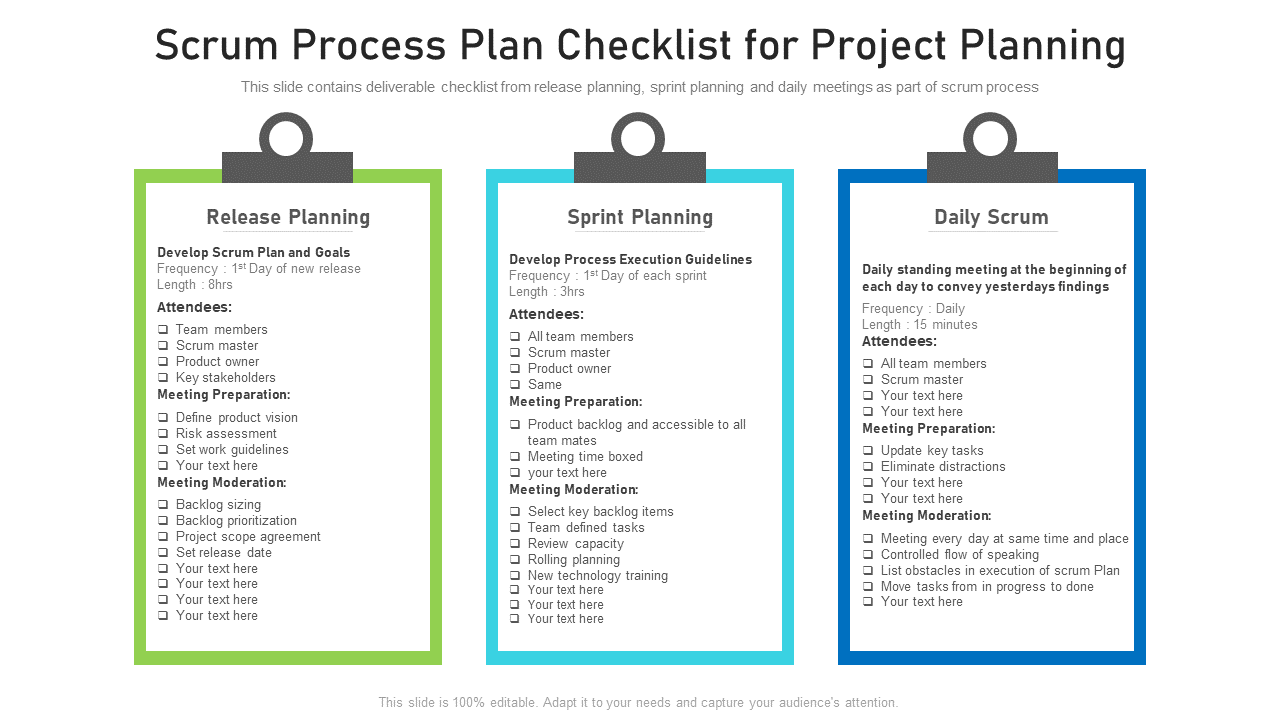
I have found that the most effective format depends on the complexity of the task. Simple procedures work well as written checklists. Complex workflows benefit from video demonstration. Interactive tasks require hands-on practice with feedback.
Types of Tutorials and When to Use Them
Not all instructional content serves the same purpose. Different formats suit different learning objectives and audiences.
Step-by-Step Guides
These are the most common type of tutorial. They present a linear sequence of actions that lead to a specific outcome. Best for procedural tasks with a clear beginning, middle, and end. Installing software, configuring settings, or completing a form.
The key to effective step-by-step guides is maintaining the right level of detail. Too little and learners get stuck. Too much and they lose focus. I aim for steps that take one to three minutes each. Longer steps should be broken into sub-steps.
Video Tutorials
Video excels at demonstrating dynamic processes, showing physical techniques, and conveying tone and personality. Best for visual learners, complex multi-step procedures, and topics where seeing someone else do it builds confidence.
The downside is that videos are harder to scan and update than text. A learner looking for one specific step must watch the entire video or navigate timestamps. Good video tutorials include chapter markers, searchable transcripts, and companion text summaries.
Interactive Tutorials
These guide learners through hands-on practice with immediate feedback. Coding exercises, simulation environments, and guided walkthroughs fall into this category. Best for skills that require muscle memory or deep understanding.
Interactive tutorials are the most effective for retention but also the most expensive to create. They require technical infrastructure, careful design of feedback mechanisms, and ongoing maintenance.
Reference Guides and Cheat Sheets
These are not tutorials in the traditional sense but serve a related purpose. They provide quick access to information for people who already understand the basics. Best for experienced users who need occasional reminders rather than comprehensive instruction.
I keep a collection of cheat sheets for tools I use regularly. They save me from re-watching tutorials or searching through documentation for information I once knew but have forgotten.
Troubleshooting Guides
These address specific problems and their solutions. Best for when something goes wrong and the learner needs targeted help. Unlike step-by-step guides, troubleshooting guides are often non-linear, presenting multiple possible causes and solutions.
The Tutorial Creation Process
Creating an effective tutorial is a craft that improves with practice and process. Here is the framework I use.
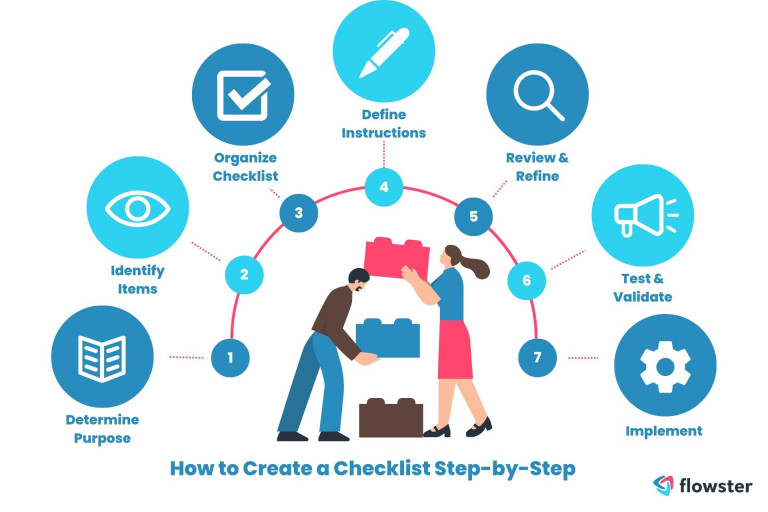
Step One: Define the Outcome and Audience
Before writing anything, answer two questions. What will the learner accomplish? Who is the learner? Write these answers down and refer to them throughout the creation process. They are your North Star.
Step Two: Do the Task Yourself
Perform the task you are teaching, paying attention to each action, decision, and potential stumbling point. Take notes. Record your screen if appropriate. Notice where you hesitate, where you backtrack, and where you rely on tacit knowledge that a beginner would not have.
Step Three: Outline the Structure
Organize your notes into a logical sequence. Identify prerequisites that must be addressed first. Break complex steps into manageable chunks. Plan where screenshots, videos, or diagrams will be most helpful.
Step Four: Draft the Content
Write the first draft quickly, focusing on completeness rather than polish. Include all the steps, explanations, and visual aids you think are needed. Do not worry about perfect wording at this stage.
Step Five: Test With a Real Learner
This is the most important and most often skipped step. Find someone who matches your target audience and ask them to follow your tutorial without your help. Observe where they get stuck, what they misunderstand, and what they skip. Their confusion is valuable data, not a reflection on your writing.
I have never created a tutorial that did not require revision after user testing. The gaps between what I think is clear and what a learner actually understands are always larger than I expect.
Step Six: Revise and Refine
Use the feedback from testing to improve your tutorial. Clarify confusing steps. Add missing explanations. Remove unnecessary detail. Improve visual aids. Repeat the testing cycle until learners can complete the task successfully without assistance.
Step Seven: Maintain and Update
Tutorials have a shelf life. Software changes. Processes evolve. Best practices shift. Schedule regular reviews of your tutorials and update them when the underlying reality changes. Outdated tutorials are worse than no tutorials because they waste time and create frustration.
Common Mistakes in Tutorial Creation
Even experienced creators fall into predictable traps. Here are the most common ones.
Assuming Too Much Knowledge
This is the cardinal sin of tutorial creation. What seems obvious to you is often invisible to a beginner. Terms you use daily may be jargon to someone else. Steps you perform unconsciously may be the exact place where a learner gets stuck.
The antidote is user testing with genuine beginners. Their confusion reveals your blind spots.
Covering Too Much Ground
A tutorial that tries to teach everything teaches nothing well. Learners become overwhelmed, retain less, and feel discouraged. Focus on one specific outcome per tutorial. If you need to cover multiple topics, break them into a series.
Neglecting Context
Steps without context feel arbitrary. Explain why you are doing something, not just what to do. Understanding the purpose behind a step helps learners adapt when circumstances differ and remember the procedure longer.
Poor Visual Design
Dense blocks of text, unclear screenshots, and inconsistent formatting make tutorials harder to follow. Use white space generously. Highlight important information. Number steps clearly. Ensure screenshots are large enough to read and annotated where necessary.
Ignoring Error Handling
Tutorials typically describe the happy path where everything works correctly. But in reality, things go wrong. Address common errors and their solutions. Explain what to do if a step does not produce the expected result.
I once followed a coding tutorial that worked perfectly until step seven, where I encountered an error the author had not mentioned. I spent two hours troubleshooting before discovering the solution was a single missing dependency that the author had installed months ago and forgotten to document.
Forgetting the Human Element
Tutorials are read by people with limited time, varying confidence, and different learning styles. A conversational tone, encouragement at difficult points, and acknowledgment that confusion is normal can make the difference between a tutorial that is endured and one that is enjoyed.

How to Learn Effectively From Tutorials
Consuming tutorials well is a skill in itself. Here are strategies for getting the most value from instructional content.
Choose the Right Format for Your Learning Style
If you learn best by watching, prioritize video tutorials. If you prefer reading at your own pace, choose written guides. If you need hands-on practice, seek interactive exercises. Do not force yourself into a format that does not match how you learn.
Do, Do Not Just Watch or Read
The biggest mistake learners make is consuming tutorials passively. Watching a coding tutorial without writing code. Reading a cooking guide without cooking. The knowledge does not stick until you apply it. Pause the video. Complete the step. Make mistakes and fix them.
Take Notes in Your Own Words
Summarizing what you learn forces processing and improves retention. Do not copy verbatim. Translate into language that makes sense to you. Draw diagrams. Create your own cheat sheet. The act of creating a personal reference is itself a learning exercise.
Build Something Real
Tutorials often use contrived examples that feel irrelevant. As soon as possible, apply what you have learned to a real project that matters to you. The motivation of genuine purpose accelerates learning and reveals gaps that tutorial exercises hide.
Teach What You Learn
Explaining a concept to someone else is one of the most effective ways to solidify your own understanding. Write a blog post. Record a video. Help a colleague. Teaching reveals what you actually understand versus what you merely recognize.
Embrace Productive Struggle
Learning is not supposed to be effortless. Confusion, mistakes, and dead ends are normal parts of the process. The tutorials that challenge you are often the ones that teach you most. Do not abandon a tutorial at the first difficulty. Work through it, seek help when needed, and celebrate the breakthrough when it comes.
Advanced Tutorial Techniques
For creators who have mastered the basics, several advanced techniques can elevate tutorial quality.
Progressive Disclosure
Present information in layers. Start with the simplest version that works. Then offer optional deeper explanations for learners who want more. This prevents overwhelming beginners while satisfying advanced users.
Branching Paths
Create tutorials with multiple paths based on learner choices or circumstances. If the learner is using Windows, show Windows-specific steps. If they are using Mac, show Mac-specific steps. This personalization improves relevance and reduces confusion.
Spaced Repetition and Reinforcement
Structure learning so that key concepts are revisited at increasing intervals. A concept introduced in tutorial one should be practiced in tutorial three and applied in tutorial five. This spacing improves long-term retention.
Community and Peer Learning
Supplement tutorials with forums, discussion groups, or study sessions where learners can ask questions, share variations, and support each other. Peer learning often addresses questions that creators never anticipated.
Assessment and Feedback
Include quizzes, exercises, or projects that allow learners to test their understanding and receive feedback. Assessment motivates completion and identifies areas where additional instruction is needed.
Frequently Asked Questions
How long should a tutorial be?
Long enough to achieve the stated outcome, and no longer. A tutorial for a simple task might be three hundred words. A tutorial for a complex workflow might be three thousand words or a series of videos. The key is maintaining focus on one clear outcome.
Should I create video or written tutorials?
Both have value. Video excels at demonstrating dynamic processes and building personal connection. Written content is easier to scan, update, and reference. Many successful creators offer both, using video for demonstration and text for reference.
How do I keep tutorials up to date?
Schedule regular reviews, at least quarterly for rapidly changing topics. Monitor user comments and support requests for signs that something has become outdated. Version your tutorials so learners can identify whether they are viewing current information.
What if my audience has very mixed skill levels?
Consider creating a series with clear leveling. A beginner track, an intermediate track, and an advanced track. Or use progressive disclosure, starting simple and offering deeper dives for those who want them.
How do I measure tutorial effectiveness?
Track completion rates, time to completion, error rates, and user satisfaction. For business tutorials, measure downstream metrics like support ticket reduction or task completion speed. The best metric is whether learners can independently accomplish the goal after following your guide.
Final Thoughts
Tutorials and how-to guides are among the most valuable content we can create and consume. They transform individual expertise into shared capability. They reduce the friction of learning new skills. They empower people to solve problems independently.
My failed spreadsheet tutorial was humbling, but it started a journey of learning how to teach effectively. The principles in this article, clarity, empathy, specificity, testing, and maintenance, have guided every tutorial I have created since. They have also guided how I consume tutorials, with more patience for the creator’s effort and more discernment about what works for my learning style.
Whether you are creating tutorials for a global audience, documenting processes for your team, or simply trying to learn something new, remember that the goal is not information transfer. It is human empowerment. The best tutorial is the one that makes the learner feel capable, confident, and ready to tackle the next challenge on their own.